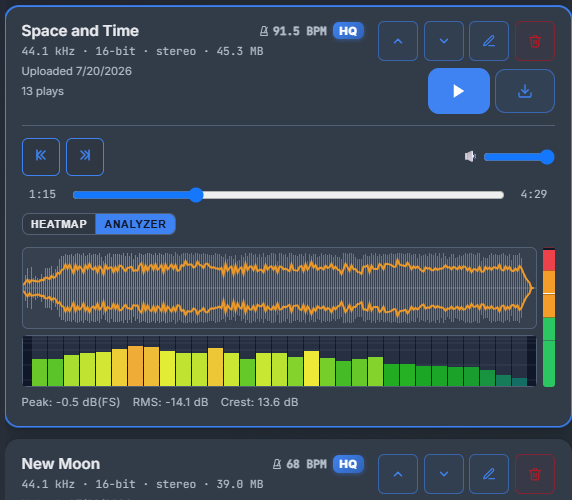
File-Sharing Application Used to Share Audio Files
Key takeaways
- Audio-specific platforms like Filepass, Boombox, Samply, and Audome deliver bit-identical WAV and FLAC downloads with in-browser streaming previews.
- WeTransfer passes files through untouched but offers no streaming previews, version history, folder-level access, or branded delivery pages.
- RockScience Audio Portal offers branded delivery on your own domain, preview-only links, and version history at $9/mo on the Pro tier, though it lacks watermarking and a mobile app.
- Test any tool with your worst-case delivery, a full album of 24-bit WAVs, to confirm files arrive bit-identical and within size caps.
- A $9/mo plan pays for itself on a single mix revision cycle if you bill per project, while per-transfer pricing suits fewer than one or two deliveries a month.
If you deliver mixes and masters to clients, the right file-sharing application predominantly used to share audio files is one that handles lossless WAV and FLAC transfers, offers preview-only links, and puts your studio’s branding on every delivery instead of WeTransfer’s. This guide compares Filepass, Boombox, Samply, Audome, WeTransfer, and RockScience Audio Portal on those criteria, with a scoring matrix and an honest look at where each one, including ours, falls short.
What makes a file-sharing application suitable for audio files specifically?
Generic transfer tools treat your mix like a zip of photos. They were built to move bytes, not to play a 24-bit WAV back to a client or put your name on the delivery page.
What generic tools get wrong for stems and masters
WeTransfer handles big files but gives clients a download button and nothing else: no streaming preview, no version history, no folder-level access per collaborator. SoundCloud previews compress your master. SFTP to a NAS works but looks like a server error page to whoever is paying you.
The four criteria that matter: fidelity, size, preview, brand
Judge any file-sharing application predominantly used to share audio files on four things: lossless delivery with no transcode, headroom for full album stems, in-browser streaming previews, and a client-facing page on your own domain. Tools like Filepass, Boombox, Samply, and Audome publish pricing against these criteria, as does RockScience Audio Portal at $9/mo for its Pro tier.
Which audio file-sharing tools handle large WAV and FLAC transfers without compression?
Most generic transfer tools re-encode previews or cap file sizes in ways that matter once you’re moving a full album of 24-bit WAVs. The question to ask any tool is simple: does the recipient download the exact bytes you uploaded?
Format fidelity: what actually arrives at the other end
Audio-specific tools like Filepass, Boombox, Samply, and Audome are built around lossless delivery: the streaming preview is a convenience layer, and the download stays bit-identical. WeTransfer also passes files through untouched, but it treats a 90MB WAV the same as a PDF, so no playback, no versioning, no context. RockScience Audio Portal keeps downloads lossless too, and streams previews for quick client checks. The honest caveat: preview quality and codec handling vary between platforms, so verify with your own dual-mono stems before committing a client delivery to any tool, ours included.
Size ceilings and album-scale transfers
| Tool | Lossless download | Album-scale stems |
|---|---|---|
| Filepass | Yes | Built for it |
| Boombox | Yes | Built for it |
| Samply | Yes | Built for it |
| Audome | Yes | Built for it |
| WeTransfer | Yes | Size caps apply |
| RockScience Audio Portal | Yes | Yes |
Per-file ceilings differ by plan on every platform, so check the tier you’d actually pay for, not the marketing page.
How do the major audio transfer tools compare side by side?
The comparison matrix
Score every tool on the same five criteria: lossless format fidelity (does it touch your WAV or FLAC?), file size ceiling, preview-only links, version history for mixes, and whether the delivery page carries your branding.
Filepass, Boombox, Samply and Audome are built for audio, so preview playback and client comments come standard. WeTransfer moves large files fast but renders no streaming previews and puts its own brand on every download page. Before trusting any of them with a master, check the vendor’s own documentation on supported formats and size limits. RockScience Audio Portal scores on the same sheet: your domain, your logo, preview-only links, folder-level access for collaborators, and version history on every mix round.
The honest scoring matters more than the scores themselves. A tool that passes stems through re-encoding, or caps a session folder at a size smaller than one album’s dual-mono stems, fails before branding even enters the conversation. Run your own worst-case delivery, a full album of 24-bit WAVs, through each tool’s free tier and watch what arrives on the other side. If the file that lands differs from the file you exported, nothing else on the feature list compensates. This single test catches more problems than any feature matrix, because vendors document best cases and you deliver worst cases. Ten minutes of uploading your heaviest session folder tells you more about a platform than an afternoon of reading pricing pages, and it costs nothing on every free tier listed here.
Where RockScience Audio Portal falls short
It is a smaller operation than the named competitors, so it lacks some polish you may expect: no mobile app, a lighter review and approval layer, and fewer integrations with your DAW-adjacent tooling. If your delivery depends on timestamped client comments pinned to a waveform, test that flow against Samply or Audome before committing. Where it wins is the part no patchwork stack gives you: every link a client opens is on your brand, at $9/mo on the Pro tier.
How do pricing tiers compare across audio-focused transfer platforms?
Most audio-focused tools charge monthly, with tiers split by storage, transfer volume, and whether you can put your own logo on the delivery page. Filepass, Boombox, Samply, and Audome all use this model. RockScience Audio Portal sits at $9/mo for its Pro tier, which covers branded transfers, streaming previews, and folder-level access for collaborators.
What a solo engineer actually needs to pay for
If you bill per project, you need three things: lossless transfers without size penalties, preview-only links so clients can’t download a rough mix, and your branding on the page the client opens. You do not need team seats, per-user pricing, or storage you’ll never fill. Anything charging extra for white-label is charging for the one feature that wins repeat clients.
Per-project cost vs monthly subscription
Run the math against your project rate: a $9/mo Pro plan pays for itself on a single mix revision cycle. If you deliver fewer than one or two projects a month, a per-transfer option like WeTransfer may cost less, but you give up version history, on-brand delivery pages, and audio-specific previews. Monthly wins once delivery is regular work.
How do audio transfer tools integrate with review and approval workflows?
A transfer link that just dumps a ZIP on your client creates the same loop every time: they download, listen somewhere else, email you timestamps, and the revision thread lives outside any tool. Audio-specific platforms try to fix that with previews, comments, and version tracking in one place.
Streaming previews vs download-only links
WeTransfer is download-first; the client grabs the file and plays it in whatever player they own. Filepass, Boombox, Samply, and Audome stream your mix in the browser, so a client can approve a master from their phone without installing anything. Some also watermark streamed previews, so if an unapproved mix leaks you can tell where it came from. Check each vendor’s docs before you commit: Filepass documents its watermarking, expiry, and folder-level access features, and the equivalents for Boombox, Samply, and Audome sit on their own sites.
Version history and revision rounds
RockScience Audio Portal keeps version history per project, so mix v4 sits next to v3 and the client’s comments stay attached to the right one. Honest limitation: it has no watermarking, so if preview-only leak protection is a must, run a dedicated tool alongside it.
What security and expiry controls matter when delivering audio masters to clients?
Expiry and access controls on unreleased material
Unreleased masters leak through links that live forever. Set an expiry date on every delivery so the link dies after the client has pulled the files, and require a password on anything going to a label or artist before release day. Folder-level access matters too: your client should see their album, not the three other projects sitting in the same directory.
If you are on SFTP to a NAS today, you already have the security but not the controls. Expiry and per-folder permissions have to be configured by hand, per client, every time.
Preview-only links before release
Before a master is approved, the client does not need the WAV. A preview-only link streams a low-latency version and blocks downloads, so rough mixes can circulate to band members without a bounced copy ending up on SoundCloud. RockScience Audio Portal supports streaming previews and download-gated delivery on your own domain; Boombox offers comparable preview flows, so check which one matches how you bill.
When should a business choose a generic file-sharing app over an audio-specific one?
When generic tools are fine
If you send one-off files to collaborators who already live in Dropbox, or you’re moving a quick reference bounce that doesn’t represent your brand, WeTransfer is the faster path. Free transfers, no account setup for the recipient, done in two minutes. The same goes for internal moves: if you’re shuttling sessions between your own machines, SFTP to your NAS costs nothing and stays lossless.
When the branded portal pays for itself
The moment a client opens a delivery link, that page is your brand. A generic download page says “this engineer uses the same tool as everyone else.” A branded audio portal with folder-level access, preview-only links, and version history says you deliver masters the way a studio does, not a teenager sending homework.
RockScience Audio Portal runs on your own domain, handles lossless formats, and starts at $9/mo on the Pro tier per the product page. If you bill per project, one client who rebooks because the delivery felt professional covers the month.
What is the fastest way to move a full album’s stems to a client?
A worked example: 10-track album delivery
Say a 10-track album lands as roughly 80 stems at 24-bit/48kHz WAV, about 12GB total. Set up one folder per song, with subfolders for dual-mono stems, rough mixes, and printed masters. Name files with a fixed scheme: 01_SongName_Kick_L.wav so the client’s DAW session imports in order.
Upload the folder structure once, keeping it intact, so folder-level access lets the client browse by song instead of digging through a flat list. Then generate two links: a streaming preview link for quick listens on the phone, and a download link for the full lossless stems.
Run the same check you would on any tool: does it keep WAVs bit-identical, does it cap your 12GB upload, and does the link carry your studio’s branding? RockScience Audio Portal handles that size and branding on the $9/mo Pro tier, though it won’t replace a client’s DAW-side review the way a dedicated feedback tool might. If your current route is zipping the album to WeTransfer, you already know the failure mode: no version history and a link that expires mid-revision.
FAQ
Is WeTransfer good enough for sending WAV files to mixing clients?
It moves WAVs through untouched, so the bytes arrive intact. What it lacks is everything around the file: no streaming preview, no version history, no branding, and no folder-level access. If you send one-off transfers to collaborators who already know you, it’s fine. For regular client deliveries, it looks like everyone else’s download page.
Can clients stream my mixes without downloading the files?
Yes, on the audio-specific platforms. Filepass, Boombox, Samply, and Audome all stream mixes in the browser, so a client can approve a master from their phone without installing anything. RockScience Audio Portal also streams previews and can gate downloads entirely. WeTransfer is download-first, so the client grabs the file and plays it locally.
How much should a freelance mastering engineer spend on file delivery each month?
If you bill per project, a plan around $9/mo pays for itself on a single mix revision cycle. You need lossless transfers, preview-only links, and your branding, not team seats or storage you’ll never fill. If you deliver fewer than one or two projects a month, a per-transfer option may cost less, but you lose versioning and branded pages.
Do any audio transfer tools watermark unapproved mixes?
Yes. Some audio-specific platforms watermark streamed previews, so if an unapproved mix leaks you can trace which client link it came from. Filepass documents watermarking among its features, and Boombox offers comparable preview flows. RockScience Audio Portal does not watermark, so pair it with a dedicated tool if leak protection on previews is essential.
What’s the cheapest way to share stems with a collaborator in another country?
For internal moves between your own machines or trusted collaborators, SFTP to a NAS costs nothing and stays lossless, though it lacks expiry controls and looks bare to clients. WeTransfer handles free one-off transfers with no recipient account. Once you need folder structure, version history, or a branded page, a paid audio portal becomes the better route.
Leave a Reply
You must be logged in to post a comment.